How to add music to your TikTok posts
This article explains how to add music to TikTok posts from the planner, what changes based on your account type, and when you need to publish manually instead.
TikTok music: how to add it when publishing
From the planner, you can add music to your TikTok posts while scheduling them. The available options depend on the type of account you have connected:
Business account: You can add TikTok’s Top 100 trending songs to both videos and photos, with filters by country and genre.
Personal account: You can add random music only to photos and carousels.
To check what type of account you have and how to change it, see How to check your account type in this article.
At the end of the article, there’s a Frequently asked questions section that covers the most common doubts.
How to add trending music - Business account
Business accounts connected to the platform have access to TikTok’s Top 100 trending songs. You can add them to videos, photos, and carousels directly from the calendar:
In Planning, create a new TikTok post.
Upload your video, photo, or carousel.
Add your post text, optional.
Under TikTok settings, click Add music.
Select the song. You can use the search bar and filter songs by country and genre.
For videos: choose the exact song snippet by dragging the time selector.
Click Save.
Choose the date and time, then finish by clicking Schedule or selecting another option from the dropdown.
If you need to make changes to your post, you can edit or remove the selected music from the planner before it’s published.
Keep the Auto-publish button enabled.
Looking for specific music outside the Top 100?
If you need to use a song that isn’t in the Top 100 trends, use manual publishing. This lets you finish your post directly in the TikTok app and access the full Commercial Music Library. See How to manually publish via notification.
How to add random music - Personal account
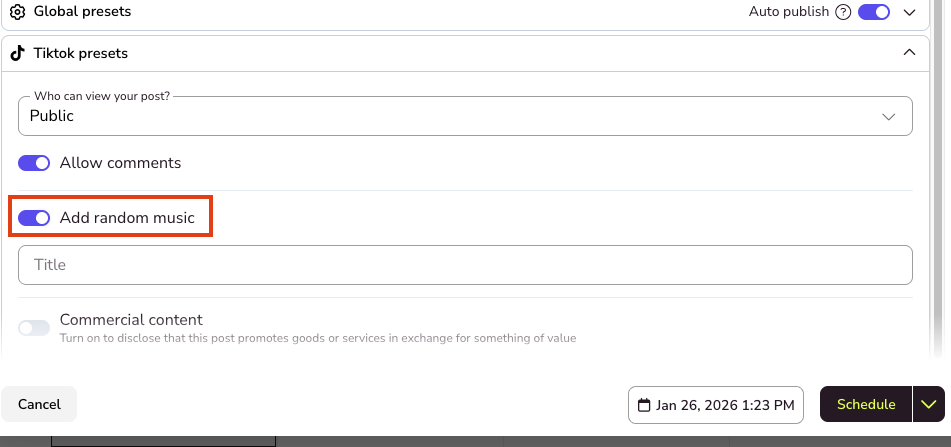
Personal accounts allow you to add random music only to photos and carousels. TikTok selects a song automatically.
In Planning, create a new TikTok post with a photo or carousel.
Upload your images.
Add your post text, optional.
Under TikTok settings, enable Add random music.
Add a title for your photo, optional.
Choose the date and time, then finish by clicking Schedule or selecting another option from the dropdown.
How to check your account type
To find out whether you have a personal or business account on TikTok:
Open the TikTok app.
Go to your profile, bottom-right icon.
Tap the menu (☰) in the top-right corner.
Select Settings and privacy.
Tap Account.
Look for Switch to Business Account or Account type.
If you see the option Switch to Business Account, you have a personal account. If you see Business Account, you already have a business account enabled.
⚠️ Before changing your account type
If you have a personal account and are thinking about switching, keep in mind that moving to a business account gives you access to more music options from the platform, but it also involves some limitations on TikTok, such as restricted use of certain songs and features.
For example, TikTok may mute the music in previous posts if they used songs that aren’t available for commercial use.
❓ Frequently asked questions
Why can’t I add trending music to my post?
To add songs from the Top 100 trends, you need a business account connected to the platform.
Personal accounts only allow random music, and only for photos and carousels.
Can I choose a specific song if I have a personal account?
No. With a personal account, TikTok selects the music automatically and you can’t choose a specific song or snippet.
Can I add music to videos with a personal account?
No. With personal accounts, adding music is only available for photos and carousels, not for videos.
What if I want to use a song that isn’t in the Top 100?
In that case, use manual publishing.
The platform will send a notification and you’ll be able to complete your post in the TikTok app, with access to the full Commercial Music Library.
Can I change or remove the music after scheduling the post?
Yes. As long as the post hasn’t been published, you can edit or remove the music from the planner.
Do I need Auto-publish enabled?
Yes. To publish automatically to TikTok and add music from the planner, the Auto-publish option must be enabled.
Is it recommended to switch my personal account to business to use this feature?
Not necessarily. Business accounts have access to more music options from the platform, but they also include restrictions on TikTok, such as limited use of non-commercial songs.
In addition, TikTok may mute the music in previous posts if they used songs that aren’t available for commercial use.
Before changing your account type, review TikTok’s official information about business accounts here.